VHF COM Radio Panel

PRD-225

Real Controls. Real Feel. Real Immersion.

A handcrafted hardware COM radio panel that brings real knobs and buttons to your flight sim — with live frequency sync, nearest airport browsing, and a high-contrast OLED display that mirrors the real thing.

Buy Now Specifications
256×64 OLED display Live SimConnect sync Nearest airport browser 25 kHz / 8.33 kHz spacing
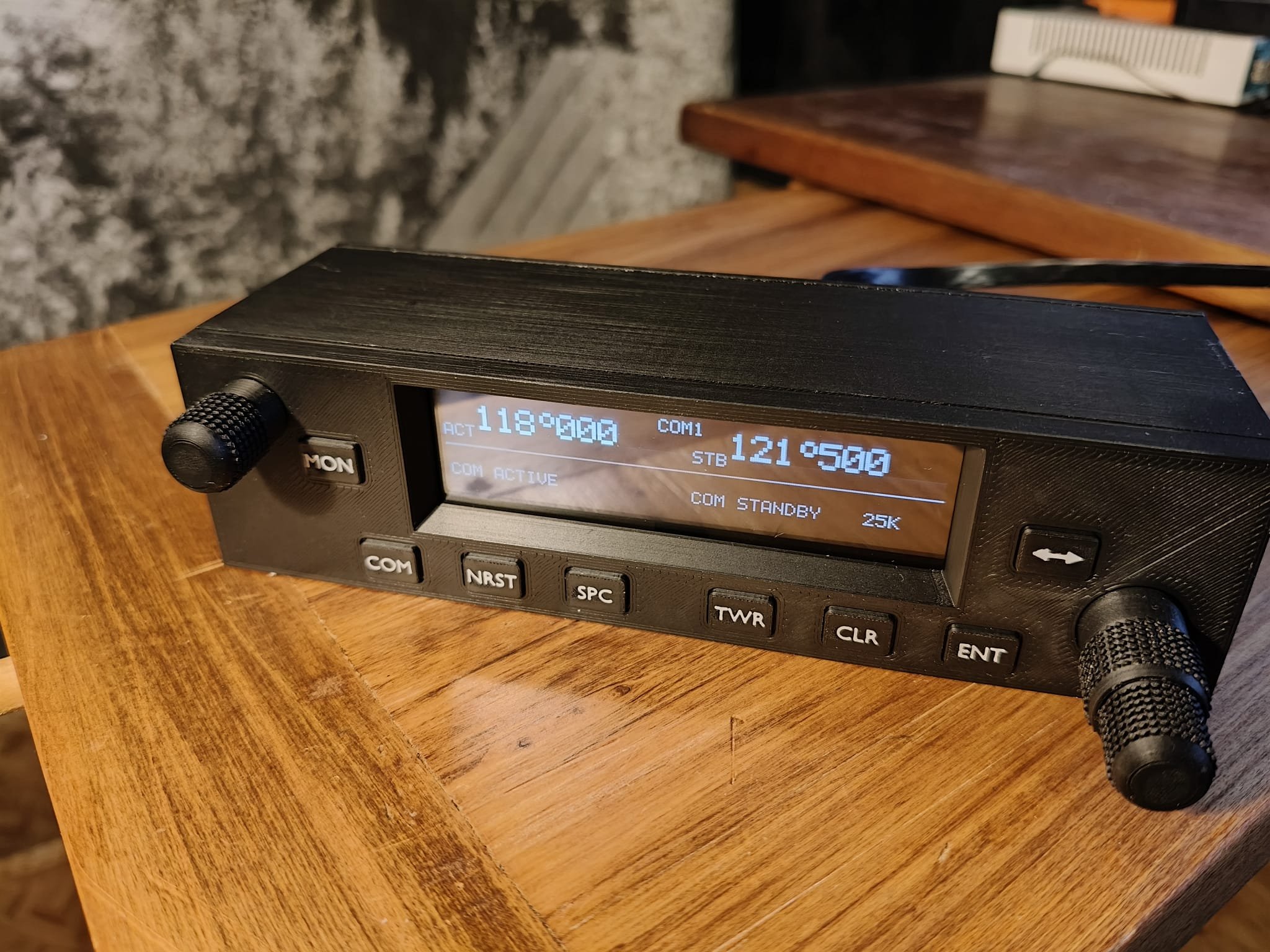
PRD-225 VHF COM radio panel showing OLED display with 118.000 active and 121.500 standby frequencies
256×64
OLED resolution
2
Rotary encoders
10
Dedicated buttons
6
Nearest airports shown
48MHz
STM32 microcontroller
What makes it different

Not just a controller.
A proper radio.

Most sim hardware maps physical buttons to keyboard shortcuts. The PRD-225 runs its own firmware on a dedicated microcontroller and communicates with the simulator through SimLinkHub, the companion Windows application.

The radio knows what the simulator knows. Turn the outer tuning knob and the standby frequency in MSFS updates immediately. Flip the frequencies and MSFS flips with you. The simulator is always the authority on the active frequency — exactly as it works in a real aircraft.

Every setting — active frequency, standby frequency, volume level, channel spacing mode — is written to on-board flash memory. Power off and reconnect: everything is exactly where you left it.

OLED display layout
ACT 118.700 COM1 TX
STB 121.500 25kHz

KLAX 3nm · KSMO 8nm · KVNY 11nm ···
ACT — Live from simulator
STB — Your tuned standby
TX — Transmit annunciator
Bottom row — Nearest airports
Key features

Everything a real COM radio does

📻

Dual-Concentric Tuning

The outer encoder ring steps the MHz digit, the inner ring steps kHz. Exactly how the real radio works — muscle memory transfers directly from the sim to the aircraft.

🔄

Flip-Flop in One Press

The dedicated swap button exchanges active and standby frequencies in a single press — just like the real thing. MSFS updates simultaneously.

🗺️

Nearest Airport Browser

SimLinkHub queries a local airport database as you fly and pushes the six nearest airports to the display. Browse, select a frequency with the tuning knob, and load it to standby — or flip it straight to active.

📶

8.33 kHz Channel Spacing

Flying European airspace? Toggle between 25 kHz and 8.33 kHz spacing with the SPC button. The radio and simulator stay synchronised regardless of which mode is active.

🔊

Volume with a Floor

The volume encoder controls COM radio volume in MSFS directly. Turning it fully down mutes the radio — but a built-in 1% floor prevents accidentally shutting the radio off entirely. Last setting is saved to flash.

Flash Persistence

Frequency, volume, spacing mode, monitor state — all written to non-volatile flash two seconds after any change. Power off and reconnect: the radio is exactly where you left it.

🔌

Automatic Reconnection

Hibernate your PC, unplug the USB cable, restart SimLinkHub — the radio detects the disconnection and reconnects automatically, re-syncing all state without user intervention.

📡

COM1 / COM2 Support

Configure the PRD-225 to control either COM1 or COM2. Running two panels? Each operates fully independently — primary and secondary radio side by side.

🎚️

Monitor & Squelch

Dedicated MON button activates MSFS radio monitoring mode. Squelch button maps directly to the simulator's squelch state. Both shown on the OLED display.

Setup

Plug in and fly

SimLinkHub handles all the connectivity. There are no drivers to install, no .ini files to edit, no configuration beyond selecting COM1 or COM2.

1
🔌
Connect USB
Plug the PRD-225 into any USB port. It appears as a standard CDC serial device — Windows recognises it automatically, no driver needed.
2
🖥️
Start SimLinkHub
SimLinkHub finds the PRD-225 on your USB ports automatically and connects to MSFS via SimConnect. Runs quietly in the background.
3
✈️
Load your flight
The display comes to life with your live COM frequencies as soon as the simulator session starts. Start flying — the radio does the rest.
SimLinkHub — free companion software

SimLinkHub is the Windows companion application that bridges the PRD-225 and MSFS. It's included with every PRD-225 purchase and available to download free from the Downloads page. Requires Windows 10 or 11 and .NET 10 Runtime.

Compatibility

Simulator support

Microsoft Flight Simulator 2024
Fully supported
Microsoft Flight Simulator 2020
Compatible (SimConnect API)

Other simulators with SimConnect API compatibility may work — contact us to discuss. X-Plane and Prepar3D support is not currently planned.

Technical specifications

Under the hood

Hardware

MicrocontrollerSTM32F072C8T6 @ 48 MHz
DisplaySSD1322 256×64 4-bit greyscale OLED
Tuning encoderEC11 dual-concentric (MHz outer / kHz inner)
Volume encoderEC11 rotary with floor limiting
Buttons10 dedicated tactile switches
ConnectionUSB-CDC serial (no driver required)
Enclosure3D-printed, handcrafted

Radio & Software

Frequency range118.000–136.975 MHz
Channel spacing25 kHz / 8.33 kHz (switchable)
Channels supportedCOM1 and COM2
Companion softwareSimLinkHub for Windows
Software platform.NET 10 Runtime (Windows 10/11)
Sim integrationSimConnect API
Nearest airportsUp to 6 shown, local database
State persistenceOn-board flash (freq, vol, mode)
Designed for

The serious sim pilot

The PRD-225 was built because clicking frequencies with a mouse breaks immersion at the worst moments.

When you're head-down copying an IFR clearance, switching to ground while watching for traffic, or finding the ATIS on a busy approach — physical controls that behave exactly like the real thing let you keep your eyes where they belong: out the virtual window.

Whether you're flying IFR into a busy Class B or wandering cross-country to uncontrolled strips, the PRD-225 puts real radio work at your fingertips.

Muscle memory — controls placed where a real radio would be, sized and weighted to match
Zero latency — knob turns and frequency changes happen simultaneously
No calibration — plug in and it works; SimLinkHub handles sync automatically
Expandable — add a second PRD-225 for COM2, or pair with other Park Road Designs hardware over CAN bus
Ready to fly with real controls?

Order the PRD-225

Handcrafted and ready to ship. Includes SimLinkHub companion software.

Order Now Ask a Question Download SimLinkHub